As I try to commit some thoughts to paper, I find myself wanting a private scratch pad.
However, GitHub Pages is only free for public repositories, and I don’t think the world needs yet another random set of malformed ramblings.
The solution I eventually landed on was to use two repositories, a public repository that holds all the structure and styling code, and a private repository that holds the private writing and drafts.
Some key constraints that I wanted to have for myself as I worked on this project:
- Use as few minutes of compute as possible for the private repository: GitHub actions for private repositories are priced per minute rounded up. The goal is to put any “expensive” compute in the public repository.
- Only trigger the build for meaningful changes: If I commit upstream a draft, or if I’m working on a branch, there shouldn’t be any expected changes to my website, so we should avoid triggering any compute.
- Handle asset portability: Images should maintain their relative positions, if they are locally hosted in the repository. Any odd shifting might break their relative positions, so it’s important to maintain that across the system with the build actions.
- Consider local development: Most cases I only need a markdown preview to write, however there might be some cases where I would need to run
jekyll serve, and it would be nice in those cases to have some kind of setup that would also render the blog posts I have in my other repository. - Try to use best practices, security wise. This means that we should use scope defined personal access tokens where possible, with minimal permissions.
On the topic of free private compute, at the time of writing GitHub Action workflows have a provided free tier of 2000 minutes/month. I typically use ~1000 minutes a month for side projects and exploratory work, but if I somehow write enough to get even close to using the rest of that quota… I guess that would be one of those “nice problems” to have.
Architecture
Since we could be making changes in either repository, we need to consistently build an page regardless of where the change is made. Duplicating build logic can also can get messy, so it’s best to keep things simple and localize the building all in one spot.
This means that a GitHub Action runner in the public repository needs to handle checking out the latest changes, combining the repositories, and then building/publishing the assets.
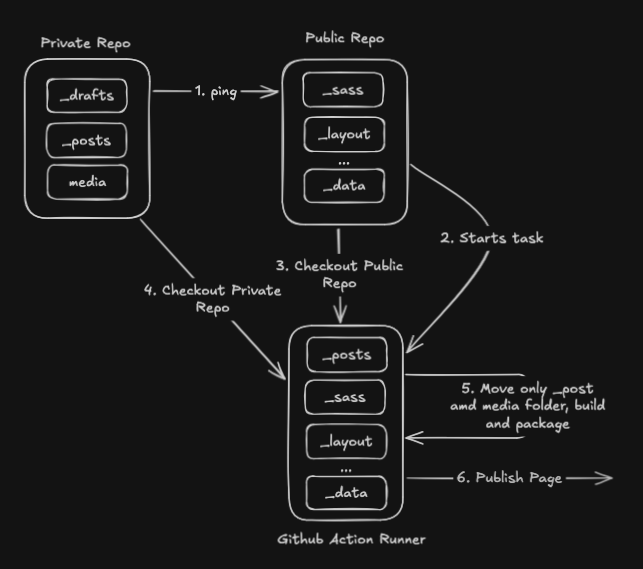
Since the public repository is handling all the heavy lifting, builds will be deterministic, regardless of where the changes are made, and only requires notifying the public repository that a build is needed.
Setup
With this outline, we can work on setting up our system. I’ll detail how to do this, so you can follow along or replicate it for yourself.
Going into this, we have a few things we need to set up:
- A public repository which contains your GitHub Pages source.
- A private repository containing your writing, media, or anything else really.
- A GitHub personal access token (We’ll set this up together later).
Note that any directory found in the private repository (e.g. _posts or _drafts) should not have a matching directory in the public repository. While a hybrid approach (mixing public and private posts) is possible, it makes handling local builds very difficult.
We’ll start the guide after these two repositories are created. If you need a guide for those steps, you can view those here:
Guide
Creating a new fine-grained personal access token
To allow GitHub actions to perform actions on our behalf (in this case, to checkout code from a Private repository), we need to give it programmatic access. The simplest way to do this is through a Personal Access Token.
GitHub has recently added a new fine grained token option, which is useful to help minimize the amount of permissions any given application has. This is a best practice to limit the blast radius if a token is ever compromised.
Additional reading: Managing Personal access tokens
Step 1: Navigate to the token page, and click “Generate new token”
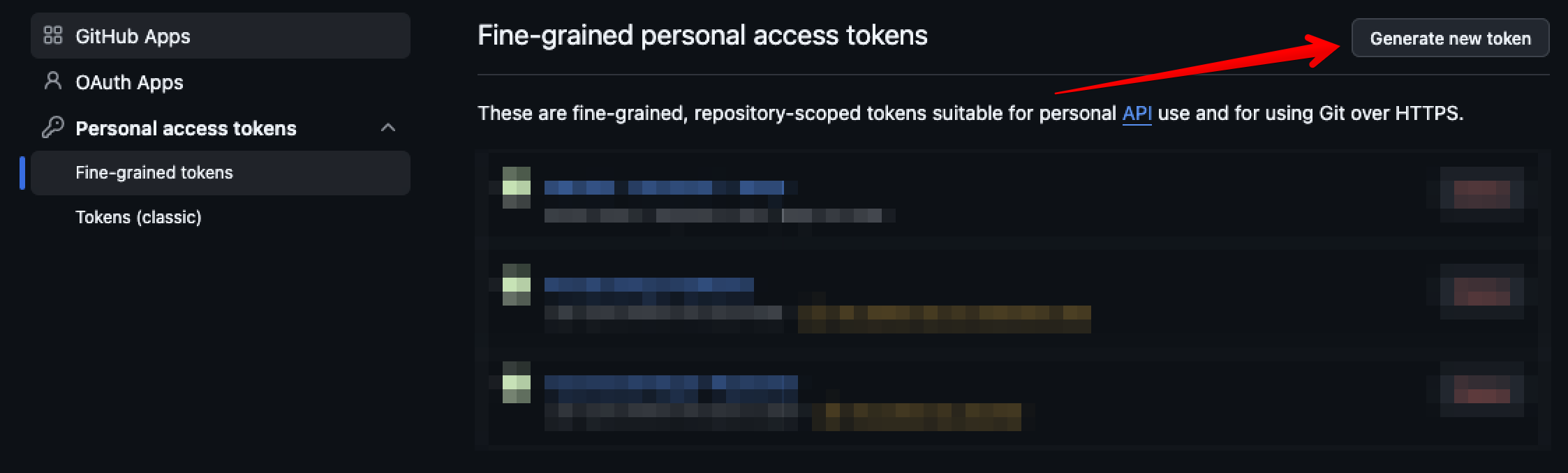
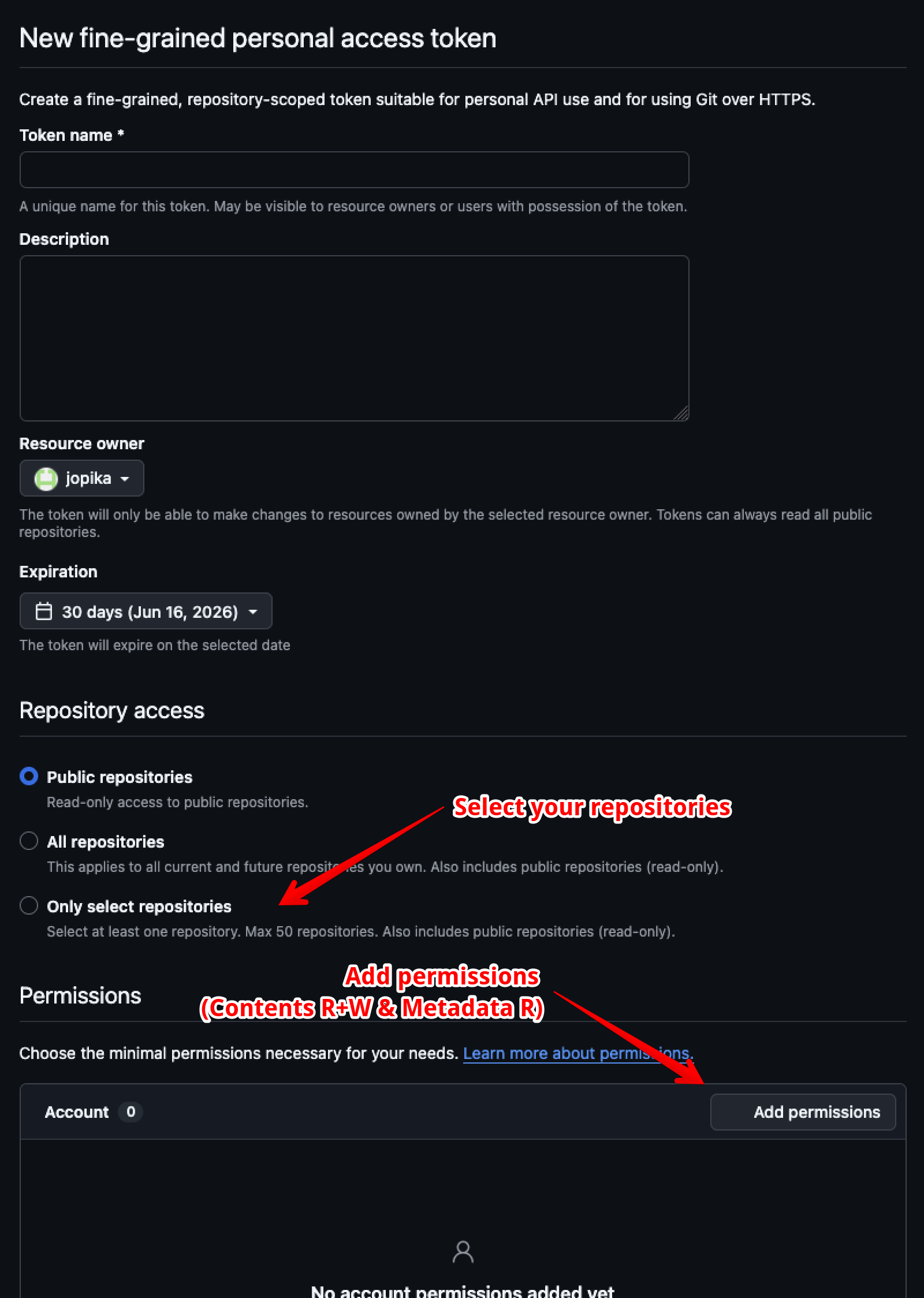
Step 2: Enter the token information (Name it something you don’t be confused in a few months)
Optionally, you can adjust how long the token will have permissions before you need to renew it. Technically you should always let it expire at some point, but if you correctly scope it, the risk is less severe.
Step 3: Select the repositories (The Public and Private Repositories)
Step 4: Add Permissions to the Token
Add “Contents - Read/Write” and “Metadata - Read-only”.
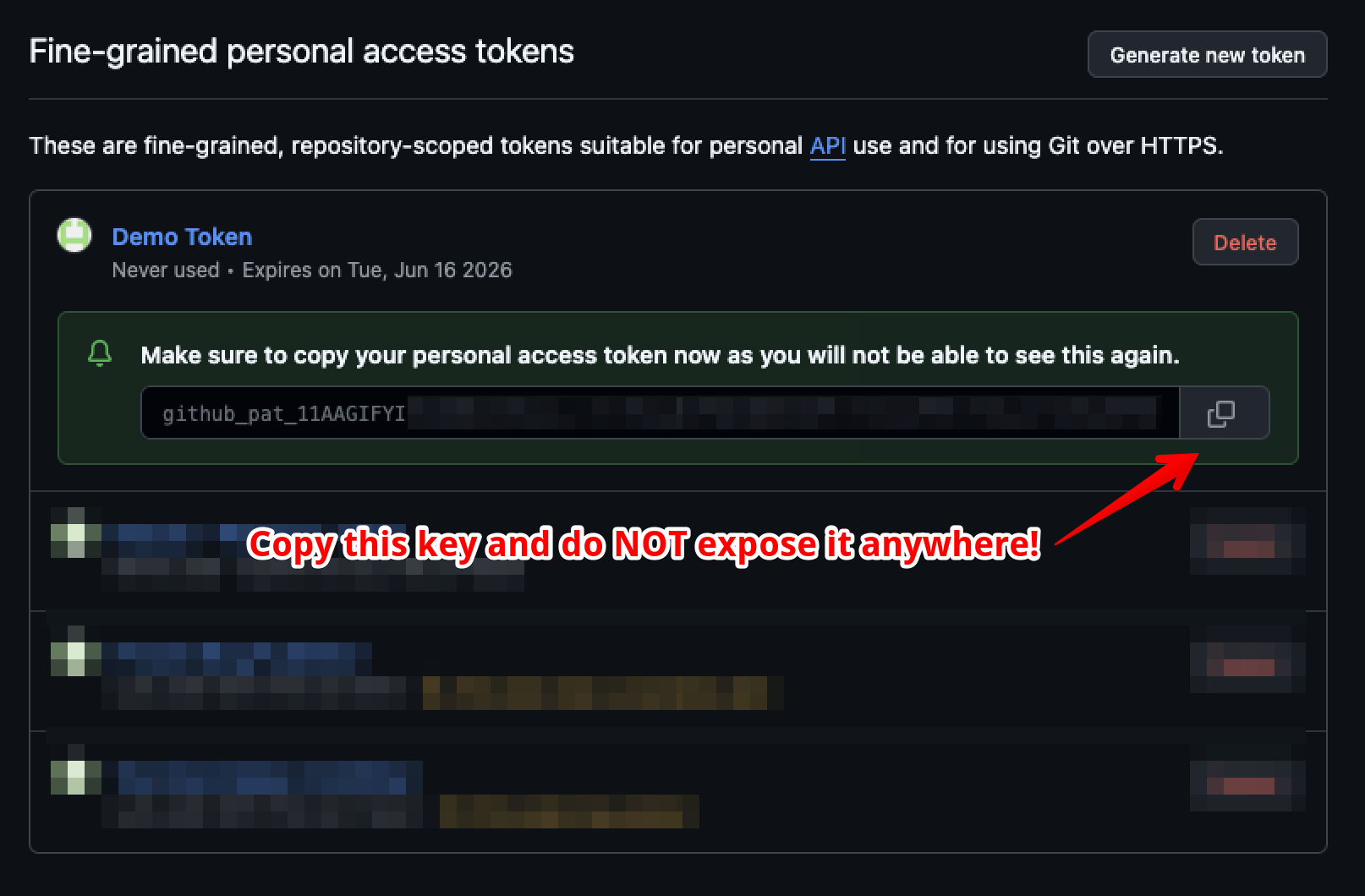
Step 5: Click Create, then copy the token value
Make sure to NEVER share this with someone else, anyone who has access to this token functionally has access to your account (limited to the permissions you have granted it). Make sure that you don’t lose this, as this is the only time that you will see the token’s string. (Don’t worry, you can always reissue the token if you need it again).
Step 6: Add these tokens to your repositories
- Go to your repository, and click “Settings”.
- Scroll down and click “Secrets > Actions”
- Click ‘New Repository Secrets”
- Add the secret name (I used
GH_PAGES_PAT), and then add the secret token that you copied in Step 5.
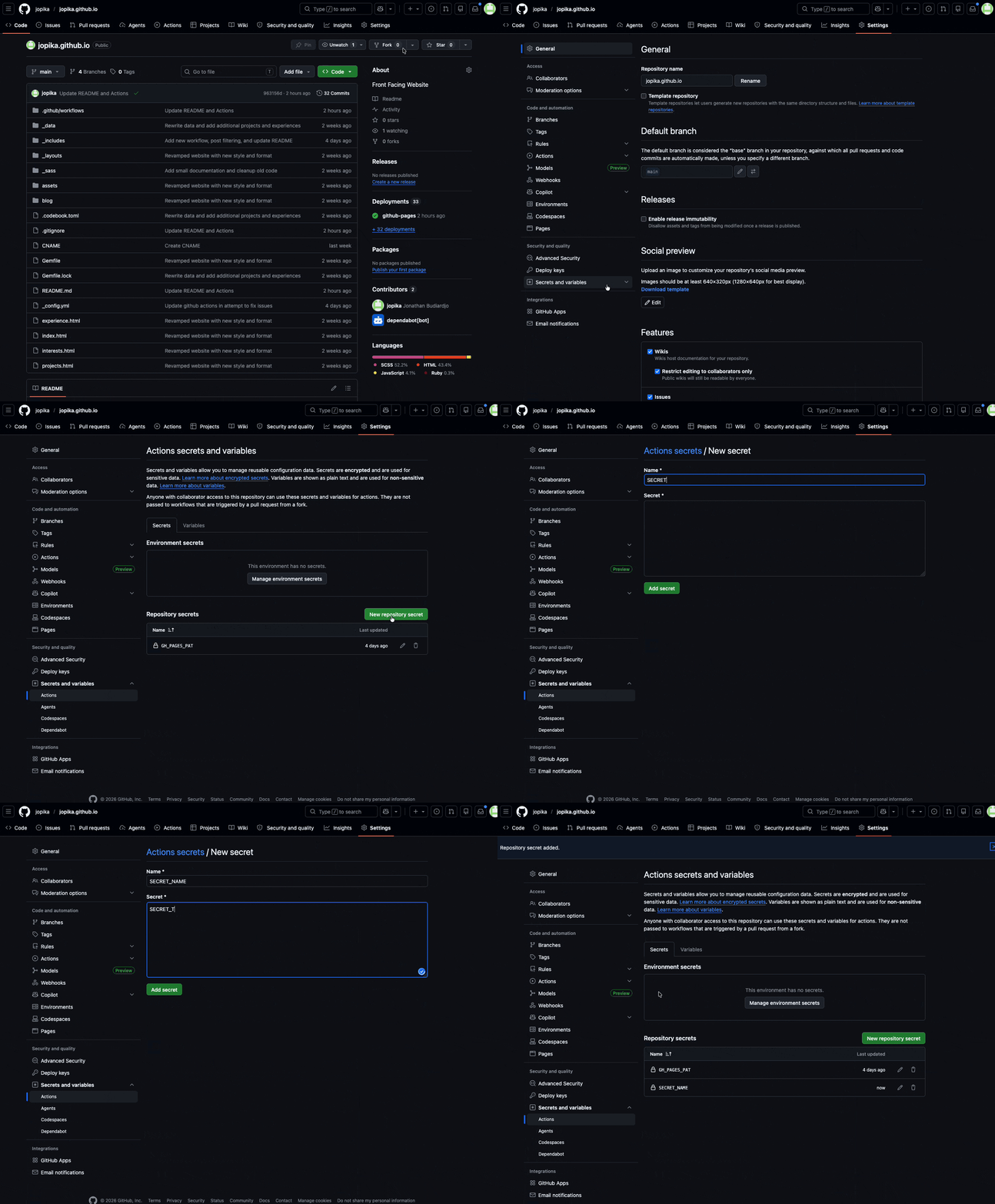
Step 7: Now repeat this again for the other repository!
Create the Public Repository GitHub Action workflow
This workflow needs to achieve the bulk of the actions.
- Checkout the public repository
- Checkout the private repository
- Move a specific set of directories (in our case, the
mediaand_postsdirectories) - Build the page and then upload the artifact
# deploy-pages.yml
# Simple workflow that will, when triggered, clone the private repo target, bundles _post files
# and then publish all non-draft/private posts.
name: Build and Deploy Pages

on:
  # Triggers when you push changes to the public repo
  push:
    branches: ["main"]
    # Add files here to prevent changes to these files in triggering the build
    paths-ignore:
      - README.md
      - .codebook.toml
      - .gitignore

  # Enable manual triggering via actions
  workflow_dispatch:
  # Triggers when it receives a ping from the private repository
  repository_dispatch:
    types: [content-updated]

# Modify these environment variables to point to the right repository
env:
  PRIVATE_REPO: jopika/blog-src
  PRIVATE_CONTENT_PATH: private-content

# Sets permissions of the GITHUB_TOKEN/GH_PAGES_PAT to allow deployment to GitHub Pages
permissions:
  contents: read
  pages: write
  id-token: write

# Allow only one concurrent deployment, skipping runs queued between the run in-progress and latest queued.
# However, do NOT cancel in-progress runs as we want to allow these production deployments to complete.
concurrency:
  group: "pages"
  cancel-in-progress: false

jobs:
  build:
    runs-on: ubuntu-latest
    steps:
      - name: Checkout Public Repository
        uses: actions/checkout@v4

      - name: Checkout Private Content Repository
        uses: actions/checkout@v4
        with:
          repository: $
          token: $
          path: $ # Clones into a temporary folder

      - name: Merge Content
        run: |
          # Create the _posts folder in the public repo if it doesn't exist
          echo "Preparing _posts folder (in case it doesn't exist)"
          mkdir -p _posts

          # Copy only the contents of the private _posts folder to the public _posts folder
          # We specifically ignore _drafts here so they are never built
          echo "Copying from $PRIVATE_CONTENT_PATH"
          cp -r $PRIVATE_CONTENT_PATH/_posts/* _posts/ || echo "No private posts to copy"

          # Copy private media into Jekyll public media paths
          mkdir -p media
          cp -r $PRIVATE_CONTENT_PATH/media/* media/ || echo "No private media to copy"

          # Delete the private-content folder so it doesn't accidentally end up in the site build
          echo "Cleaning up $PRIVATE_CONTENT_PATH"
          rm -rf $PRIVATE_CONTENT_PATH

      - name: Setup GitHub Pages
        uses: actions/configure-pages@v5

      # NOTE: This assumes we are using Jekyll. If we are using Hugo, Next.js,
      # or something else, replace this step with the appropriate build command.
      - name: Build with Jekyll
        uses: actions/jekyll-build-pages@v1
        with:
          source: ./
          destination: ./_site

      - name: Upload artifact
        uses: actions/upload-pages-artifact@v3

  deploy:
    environment:
      name: github-pages
      url: $
    runs-on: ubuntu-latest
    needs: build
    steps:
      - name: Deploy to GitHub Pages
        id: deployment
        uses: actions/deploy-pages@v5
Things you should update:
- Update the
PRIVATE_REPOvariable to[GITHUB_USERNAME]/[PRIVATE_REPO_NAME]. - If you picked a different secret name, change
secrets.GH_PAGES_PATto whatever you selected.
Create the Private Repository GitHub Action workflow
Now we need to create a workflow on the private repository that will ping the public repo to start building on a detected change.
Eagle eyed readers might have noticed that we defined repository_dispatch as a trigger, this is what we will leverage. We can send a notification from the private repository to the public workflow by using curl against the dispatch endpoint.
# publish-blog.yml
# Simple workflow that triggers a remote build via the Github API using the Dispatches action
#
name: Trigger Github Pages build

on:
  push:
    branches: ["main"]
    # Only trigger the workflow if published posts or their media change
    paths:
      - "_posts/**"
      - "media/**"

  # Enable manual triggering in the event a manual sync is needed
  workflow_dispatch:
  schedule:
    # Runs at 00:00 UTC on the first of the month
    - cron: "0 0 1 * *"

# Variables to help manage
env:
  TARGET_REPO: jopika/jopika.github.io

# Allow only one concurrent deployment, skipping runs queued between the run in-progress and latest queued.
# However, do NOT cancel in-progress runs as we want to allow these production deployments to complete.
concurrency:
  group: "pages"
  cancel-in-progress: false

# Default to bash
defaults:
  run:
    shell: bash

jobs:
  ping-public-repo:
    runs-on: ubuntu-latest
    steps:
      - name: Send Repository Dispatch Event
        # We use a simple curl command to ping the GitHub API to ping the
        run: |
          curl -L \
            -X POST \
            -H "Accept: application/vnd.github+json" \
            -H "Authorization: Bearer $" \
            -H "X-GitHub-Api-Version: 2022-11-28" \
            https://api.github.com/repos/$TARGET_REPO/dispatches \
            -d '{"event_type": "content-updated"}'
Things you should update:
- Update the
TARGET_REPOvariable to[GITHUB_USERNAME]/[PUBLIC_REPO_NAME]. - If you picked a different secret name, change
secrets.GH_PAGES_PATto whatever you selected.
[Optional] Setup a script to streamline
You should be done at this point, as the repositories should be able to coordinate builds now. However we now have a small issue - running bundle exec jekyll serve is incomplete, since the blog posts and media files are now located in a different directory. We can patch this issue by setting up a file watcher strategy and rsync file across the directory.
We can build a simple script to help automate this process, this script will automatically manage the syncing your files and also run jekyll serve.
#!/usr/bin/env bash
set -euo pipefail

# ── Paths ─────────────────────────────────────────────────────────────────────
JEKYLL_DIR="$(pwd)"
BLOG_SRC="$(dirname "$JEKYLL_DIR")/blog-src"

# ── Helpers ───────────────────────────────────────────────────────────────────
log() { echo "[$(date '+%H:%M:%S')] $*"; }

# ── Preflight checks ──────────────────────────────────────────────────────────
if ! command -v fswatch &>/dev/null; then
  echo "Error: fswatch not found. Install it with: brew install fswatch"
  exit 1
fi

if [ ! -d "$BLOG_SRC" ]; then
  echo "Error: source repo not found at '$BLOG_SRC'"
  exit 1
fi

# ── Sync helper ───────────────────────────────────────────────────────────────
RSYNC_EXCLUDES=(
  --exclude='._*'
  --exclude='.DS_Store'
  --exclude='.Spotlight-V100'
  --exclude='*.swp'
  --exclude='*~'
)

do_sync() {
  rsync -av --delete "${RSYNC_EXCLUDES[@]}" "$BLOG_SRC/_posts/"  "$JEKYLL_DIR/_posts/"
  rsync -av --delete "${RSYNC_EXCLUDES[@]}" "$BLOG_SRC/_drafts/" "$JEKYLL_DIR/_drafts/"
  rsync -av --delete "${RSYNC_EXCLUDES[@]}" "$BLOG_SRC/media/"   "$JEKYLL_DIR/media/"
}

# ── Initial sync ──────────────────────────────────────────────────────────────
log "Initial rsync..."
do_sync
log "Initial sync done."

# ── Cleanup on exit ───────────────────────────────────────────────────────────
PIDS=()
cleanup() {
  log "Shutting down..."
  for pid in "${PIDS[@]}"; do kill "$pid" 2>/dev/null || true; done
  wait 2>/dev/null || true
  log "Done."
}
trap cleanup EXIT INT TERM

# ── File watcher ──────────────────────────────────────────────────────────────
watch_and_sync() {
  log "Watching $BLOG_SRC for changes..."
  fswatch \
    --event Created --event Updated --event Removed --event Renamed \
    --exclude '/\._' --exclude '/\.DS_Store' --exclude '/\.Spotlight' \
    "$BLOG_SRC/_posts" "$BLOG_SRC/_drafts" "$BLOG_SRC/media" \
  | while read -r; do
      log "Change detected, syncing..."
      do_sync
      log "Sync complete."
    done
}

watch_and_sync &
PIDS+=($!)

# ── Jekyll ────────────────────────────────────────────────────────────────────
log "Starting Jekyll${*:+ (flags: $*)}..."
bundle exec jekyll serve --livereload "$@" &
PIDS+=($!)

wait
Things you should update:
- Change the relative path for
BLOG_SRCto point to the locally checked out blog repository.
Save the script in the public repository (serve.sh), make sure it’s executable (chmod +x serve.sh) and then run it (./serve.sh).
You can also pass in parameters to the script, such as --drafts (./serve.sh --drafts) to also render the drafts in the preview page.
Final Thoughts
This was a fun experiment in learning more how GitHub Actions works under the hood, along with coming up with a fun mechanism to handle some odd edge cases when it came to building the syncing script. I’m excited to keep messing around with more GitHub action workflows, as they seem quite powerful and I think the ability to automate workflows is very useful.
Other things I tried
I initially attempted to use symlinks to allow the builder to pick up the files from the private repo, however a limitation in the file watcher (inotify) doesn’t detect changes to symlink-ed files, which prevents the fastest way to iterate when working. This led to building out the script solution which would use rsync instead. The end result is a very similar workflow the “original” structure, which is great.
Another thing that didn’t work as well as I hoped was handling media files, I attempted to bundle them into the same folder as _posts, or simply enable a more streamlined reference. However it appears the Jekyll version and importable actions currently don’t support anything super complex. You might be able to roll your own script to handle the building and packaging, but might be a future project.
Some Caveats
- Make sure to not leak information: Artifacts that get built are hosted on GitHubs artifact server, which means that anyone could technically poke around and find files that might not be fully published if they know what to look for. This is why part of the build script deletes anything we don’t use directly.
- Media files have a unique structure when referencing inside the blog posts, this is a bit verbose and I wonder if it can be simplified. Here is an example:
You can note that you need to specify the full relative path along with the filter
| relative_url, otherwise the media will likely not render correctly.
An alternative: Built-in Jekyll management
Jekyll does support some global variables, such as the published keyword. Setting it to false prevents it from being picked up in the build, unless you use the --unpublished flag. Neat built-in, but since my repository is public it doesn’t address the core issue here. If you already are publishing on a private repo, this is probably the easiest way to do this.